
A NetFlow record says traffic entered interface 5 and left by interface 3. With SNMP switched on, FlowSphera asks the device what those are, so the pages say wan1 and internal, know the networks behind them and the speed of each port. It also reads every interface's byte counters each minute: Capacity then plans with every byte the port carried, not only what the device exported.
1. Open the device and switch SNMP on
In Settings → Devices, pick the device and press Edit. Tick Read interface names and IP addresses over SNMP at the bottom of the form.
2. Choose v2c or v3
- v2c needs a community — a read-only password shared with the device.
- v3 is the safer choice: a user, a security level (authentication, or authentication and privacy) and the algorithms the device supports. The dialog offers only what your vendor's devices accept.
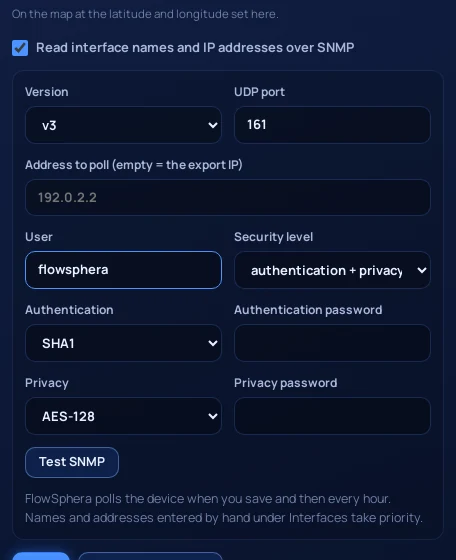
The Address to poll stays empty when the device answers SNMP on the address it exports from.
3. Let the device answer
The configuration box on the left now ends with the SNMP commands for your vendor, with the FlowSphera server's address filled in — copy them to the device. For MikroTik with v2c, for example:
/snmp community add name=<community> addresses=<COLLECTOR_IP>/32 read-access=yes
/snmp set enabled=yes
The device must also let the server reach UDP port 161: on a FortiGate, snmp in allowaccess of the interface
FlowSphera reaches it through; on a MikroTik, an accept rule in the input chain if the default firewall blocks that
interface — the dialog adds it.
4. Test and save
Press Test SNMP: it shows the device's name and how many interfaces and addresses it found, or what went wrong (no answer, wrong community or user, an algorithm the device refuses). Then Save. FlowSphera polls the names and addresses at once and every hour, and the counters every minute.
What changes after that
- Every page names the interfaces; Through device and Path analysis show them with their addresses.
- Top hosts → Networks finds your networks from the interface addresses.
- Capacity knows each port's speed and uses the interfaces' own counters.
- Names you type yourself in Settings → Devices → Interfaces always win over SNMP.
- Path analysis also reads the devices' LLDP neighbours: links without addresses of their own (unnumbered) appear, and Settings → Devices → Interfaces shows the router and port at the other end.
Passwords and communities stay on the server, readable by the service only, and are never sent back to the browser.
Questions
Which SNMP versions does FlowSphera support?
v2c and v3 (authentication MD5, SHA and SHA-2; privacy DES, AES, AES-192 and AES-256, as far as your device supports them).
Does SNMP change anything on the device?
No. FlowSphera only reads: interface names, descriptions, states, addresses, speeds and byte counters.
Test SNMP says «no answer». What now?
Check that the device lets the FlowSphera server reach UDP 161 on that interface, that the community or user matches, and that nothing between them filters UDP 161.