
Every page shows an inside host by its name when it has one. A name comes from, in this order:
- The name you gave it — Settings → Flow configuration → Host names, or a CSV file. It always wins.
- A device's own address — shown as fw-main (self).
- Reverse DNS (PTR) — asked from your DNS server, for private addresses only.
1. Open the setting
Sign in as an administrator and open Settings → General → Host names from DNS.

2. Choose how much to ask
| Choice | What is asked | When to choose it |
|---|---|---|
| In the background (default) | the inside hosts of the last 7 days, busiest first, at most 20,000, each once a day — at most 5, 20 or 50 lookups a second, never more than four at a time | most networks: the search box finds any host by name |
| Only shown hosts | the hosts a page shows, each at most once an hour | a DNS server you want to touch as little as possible |
| Off | nothing; DNS names are not shown | no PTR records in your network, or a policy against it |
Press Save. The card shows how many names are known and when the last background pass ran.
Will it overload my DNS server?
No. Twenty lookups a second is the ceiling of the first pass of the day — about 17 minutes for 20,000 hosts — and every answer, «no name» included, is kept for 24 hours and across restarts. With at most four lookups in flight, a slow DNS server automatically gets fewer. A DNS server answers thousands of queries a second, and your network's own computers send far more.
Turn it down or off if your DNS server has no reverse zones for its private ranges and forwards those queries to your provider or a public resolver: they would then leave your network. Well-run servers answer private ranges themselves.
Hosts that get their address from DHCP
A name belongs to the address at the time it was looked up and is refreshed daily (hourly for a host on screen). If your DHCP server registers its leases in DNS — as Active Directory does — the names follow the leases. The flow records keep the address, so a period long ago is shown with that address's name of today. For a host that must keep its name, reserve its address in DHCP and name it in Host names.
See the names, make one your own
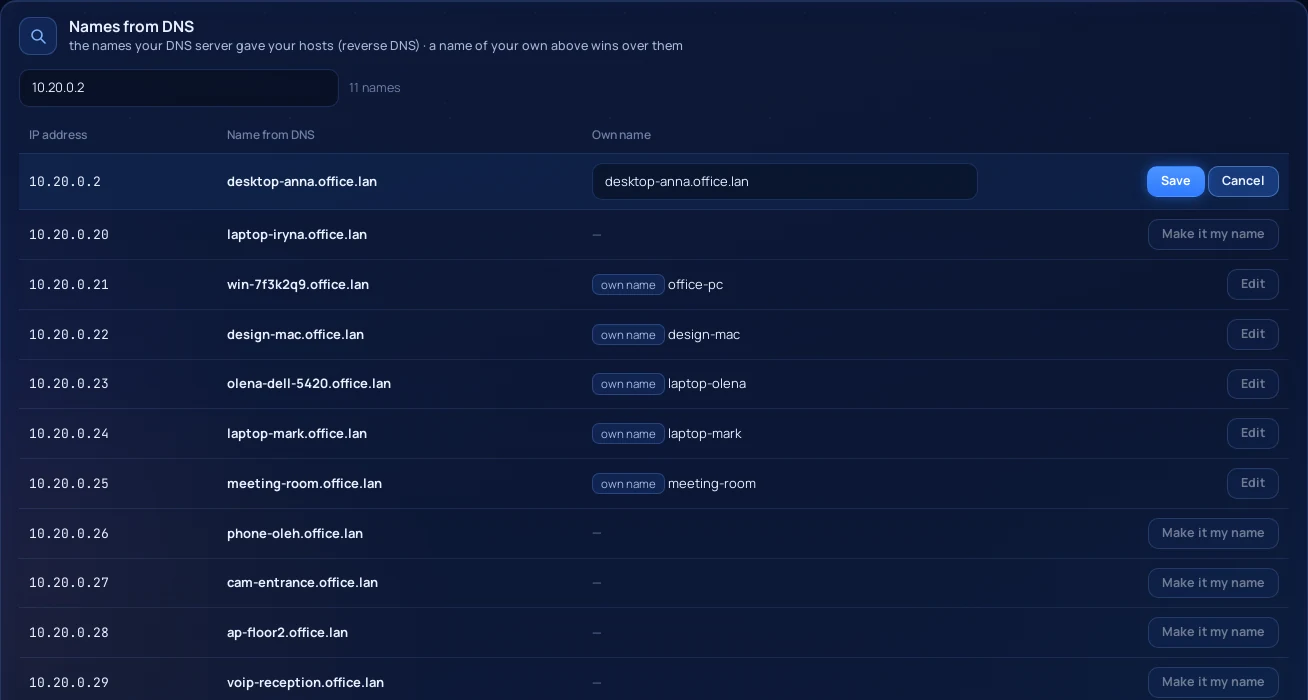
(2.12) Settings → Flow configuration → Names from DNS lists every name the DNS server gave, with search, next to the name you set yourself. When DNS calls a host something unhelpful (win-7f3k2q9), press Make it my name, type the name you want and save: it goes into Host names and wins from then on.
For automated installs
FT_DNS_RATE in /etc/flowsphera/env sets the default for a new server: 0 (off), shown, or 5 / 20 / 50.
A choice saved in the settings wins over it.
Questions
Which addresses are looked up?
Only private (inside) addresses. Public addresses are shown with their owner and country from the GeoIP data.
Where are the names kept?
In /var/lib/flowsphera/dns_names.json on your server, for 30 days after a host was last seen.
I switched DNS off. Do the names I typed still show?
Yes — the names you give hosts in Settings → Flow configuration never depend on DNS.