
A laptop that talks to a botnet controller, a server answering a known attacker, traffic to a criminal netblock — these show up in your flows long before anyone notices. FlowSphera checks every connection against reputation lists and raises an event the moment one of your hosts is in contact with a listed address.
1. Look at the built-in lists
Open Settings → Events → IP reputation. Eight free public lists are on by default: botnet controllers and malware hosts (abuse.ch Feodo Tracker, ThreatFox), criminal netblocks (Spamhaus DROP), hosts seen attacking (ET, CINS Army, blocklist.de, DShield) and Tor exit relays. Your server downloads them from their publishers once a day.
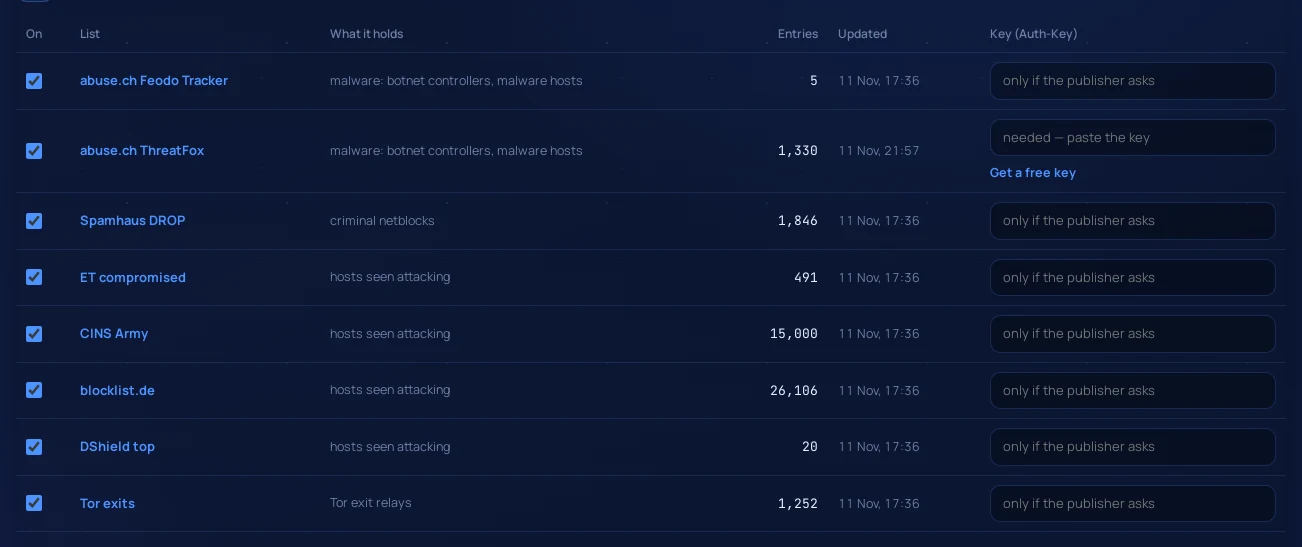
ThreatFox asks for a free key from abuse.ch: press Get a free key, paste it into its row and save.
2. Add your own addresses
The Own list takes up to 20,000 addresses and networks, one per line. Text after # or ; is a comment, so a list
copied from a publisher works as it is.

3. Add a list by URL
For a list that lives on the web — a vendor's feed, your SOC's export, a partner's list of scanners — press Add a list by URL (up to ten):
- a name, shown in the events and notifications;
- the URL,
http://orhttps://; - what it holds — malware, criminal netblocks, hosts seen attacking, spam sources or Tor exits;
- how often to download it — every hour, every 6 or 12 hours, daily or weekly.

Save. The list is downloaded within 10 minutes, then on its schedule; the table shows its entries and when it was updated. Plain text, CSV, JSON and JSON lines are all read. A download that fails or comes back empty keeps the last good copy and says so in the table.
4. See the events
Contact with a listed address appears on the Events page — Contact with malware infrastructure (critical) or Contact with a listed address — with the host, the address, its country and owner, the ports and the lists that hold it, and goes to your notifications. Set them up next: Telegram notifications.
Safe by design
Private and reserved ranges and blocks wider than /8 are always left out of every list, so a mistake in a list can never flag your LAN or the whole internet. The lists stay on your server; nothing about your traffic is sent to them.
Questions
Does checking the lists slow FlowSphera down?
No. The lists are held in memory as sorted ranges; a list of a few hundred thousand entries costs a few megabytes and each lookup is a binary search.
Can I use FireHOL or other aggregated lists?
Yes, as a list by URL — any plain-text list with one address or network per line works.
A listed address is a false alarm in my network. What now?
In Settings → Events → Exceptions ignore the address or exclude that connection; the list itself stays untouched.