
How much did each person or device use this month? On a FortiGate the question sounds simple, and the answer depends on where the logs live. FlowSphera itself started with exactly this question on a FortiWiFi-40F at home. This guide shows what FortiOS gives you on its own, and how to get traffic per user for any day or month with NetFlow and FlowSphera.
What the FortiGate shows by itself
FortiView shows the top sources, destinations and applications. For anything older than the current sessions it needs a log store: Fortinet's documentation says disk logging or remote logging (FortiAnalyzer, FortiAnalyzer Cloud or FortiGate Cloud) must be enabled to see historical data. Without one, FortiView draws from the session table and shows only now. Small desktop models have no log disk, so on them a monthly view per user means a remote log service.
NetFlow is the other way: the FortiGate sends a short record of every session to a collector that keeps the history.
1. Install FlowSphera
On a Linux server or VM that the FortiGate can reach over UDP (Debian, Ubuntu, Fedora, RHEL, Rocky or Alma; x86_64 or arm64):
curl -fsSL https://raw.githubusercontent.com/telesphera/flowsphera/main/install.sh | sudo bashThe free Community edition has every feature, up to 5,000 flow records per second and 30 days of history, which is enough for a month view on most office networks; a Pro license keeps more months. Details: Install FlowSphera.
2. Send NetFlow from the FortiGate
config system netflow
    set active-flow-timeout 60
    config collectors
        edit 1
            set collector-ip <COLLECTOR_IP>
            set collector-port 2055
            set source-ip <FW_LAN_IP>
        next
    end
end
config system interface
    edit "wan"
        set netflow-sampler both
    next
    edit "internal"
        set netflow-sampler both
    next
end
Use your interface names. FortiOS exports per session, so a session crossing two sampled interfaces is still counted once. Wi-Fi SSID interfaces cannot be sampled: traffic between an SSID and a sampled interface is seen, traffic between two SSIDs is not. The full walk-through with checks: Configure NetFlow on FortiGate.
3. Give each device the name of its user
FlowSphera counts traffic per device (per inside IP address). It does not read the names of users signed in on the FortiGate (FSSO or firewall authentication), so the way to «per user» is to name the devices:
- Keep addresses stable. Give each device a DHCP reservation on the FortiGate, so an address always means the same laptop or phone.
- Name them. In Settings → Flow configuration → Host names type
192.168.1.23 → Olena laptop, or import a CSV with all of them at once. Names from reverse DNS are picked up too. See Host names from DNS.
From then on every page, report and CSV shows the name.
4. See the month per user
Open Usage and choose 30 days or your own dates. It shows what was downloaded and uploaded, who uses most, and the biggest changes against the period before. Download CSV exports every device with its totals, for a monthly report or to split the bill between departments or tenants.
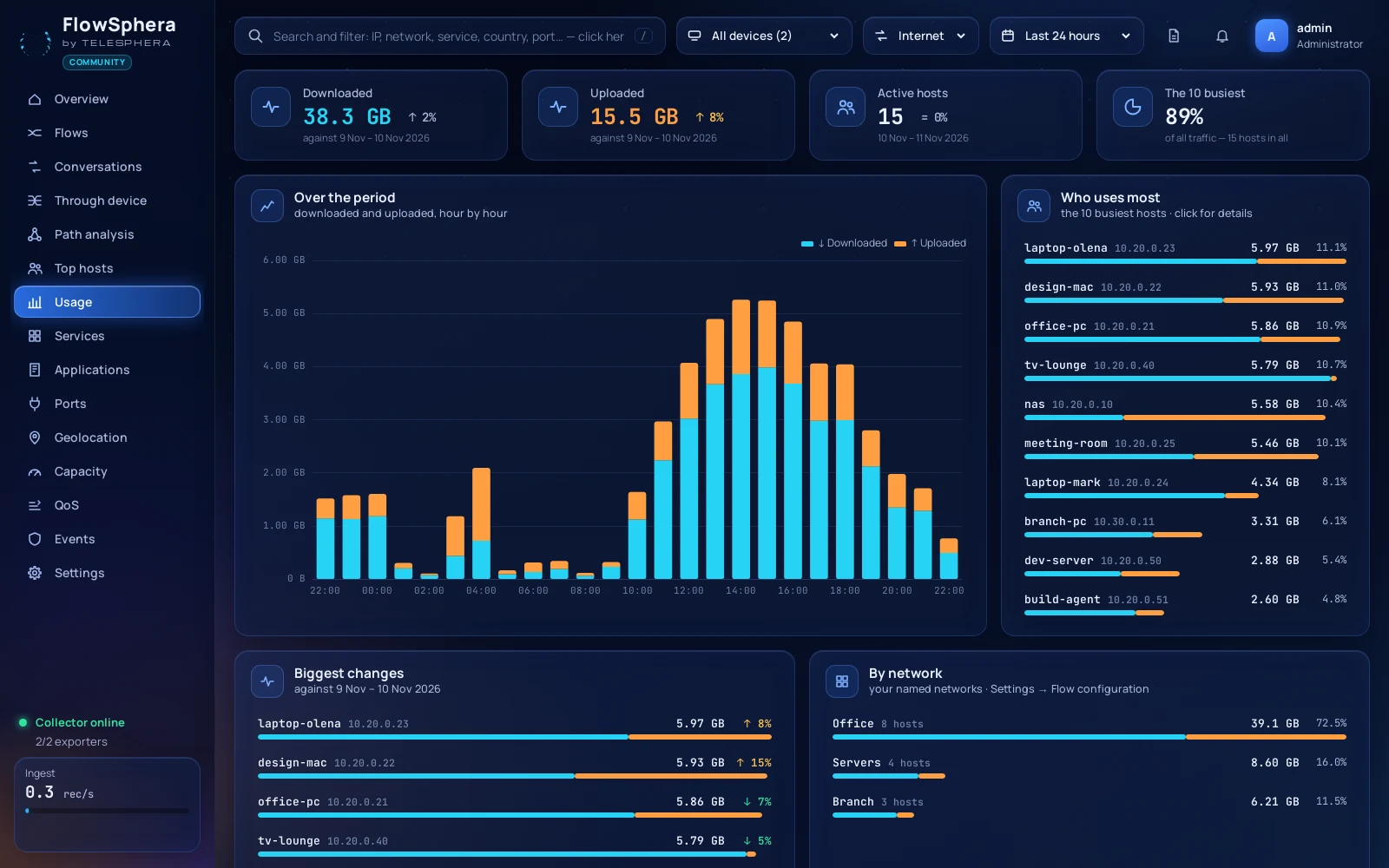
More: Usage per host, Top hosts and networks.
5. What each user did
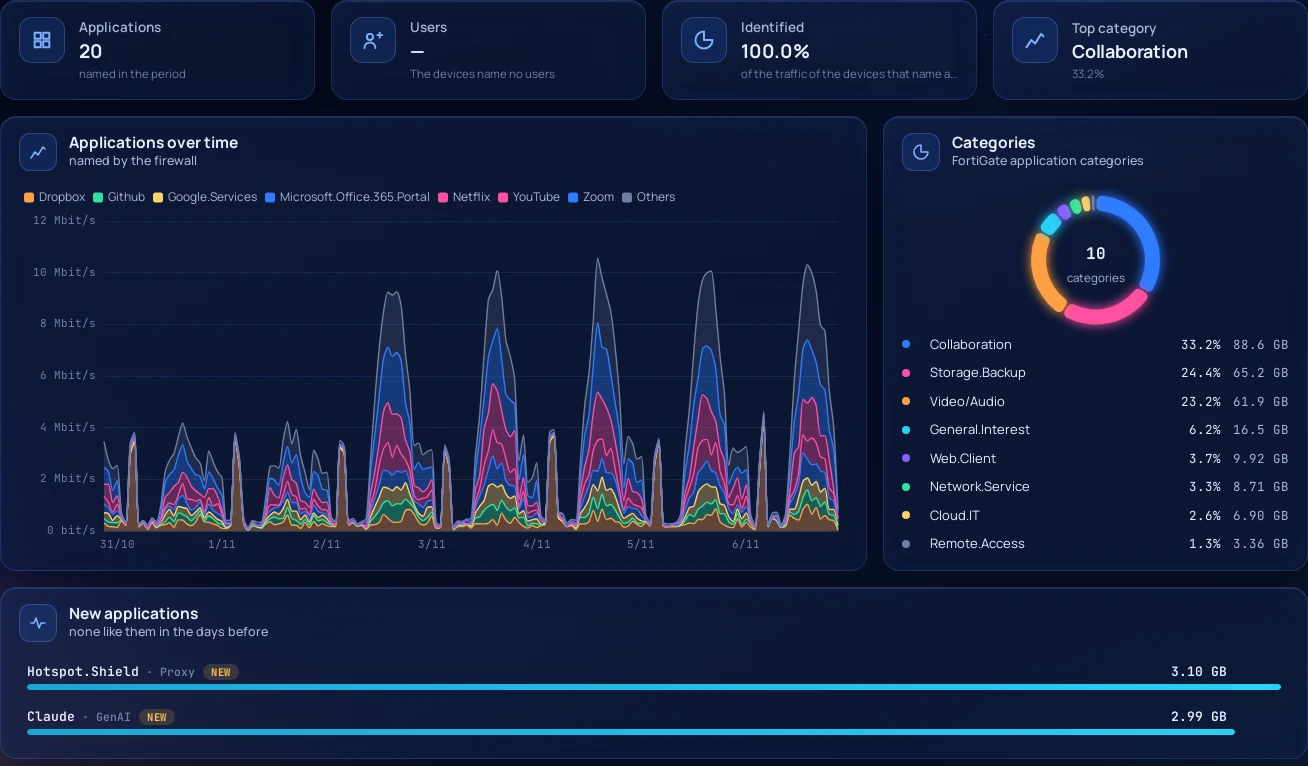
Click a device to open its card: the services and countries it talked to and its busiest conversations. With Application Control on the FortiGate's policies (a profile, even monitor-only) FortiOS adds the application to every record, and FlowSphera shows FortiGate's own application names and categories. See Services and applications.
6. Get it by e-mail every month
A scheduled report sends a PDF with the busiest devices, their usage, services and the traffic over time every month on the day you choose, or every week or day.
Questions
Why does FortiView show no history?
FortiView needs disk logging or remote logging (FortiAnalyzer, FortiAnalyzer Cloud or FortiGate Cloud) for historical data. Without them it shows only the current sessions.
Can I see monthly traffic per user without FortiAnalyzer?
Yes: export NetFlow from the FortiGate to a collector such as FlowSphera and open Usage for 30 days. The free Community edition keeps 30 days of history.
Does FlowSphera show the FortiGate user name?
No. It counts per device (IP address). Give devices DHCP reservations and name them in Host names, and every page and report shows the name.