
With more than one device exporting, FlowSphera can show how they connect. Devices are neighbours when LLDP shows them at each other's ports (read over SNMP), when you set the link by hand in Settings → Devices → Interfaces, when their interface addresses share a subnet (read over SNMP or typed there) or when one records the other's addresses on an interface. The links carry the traffic between them — and show where something is missing.
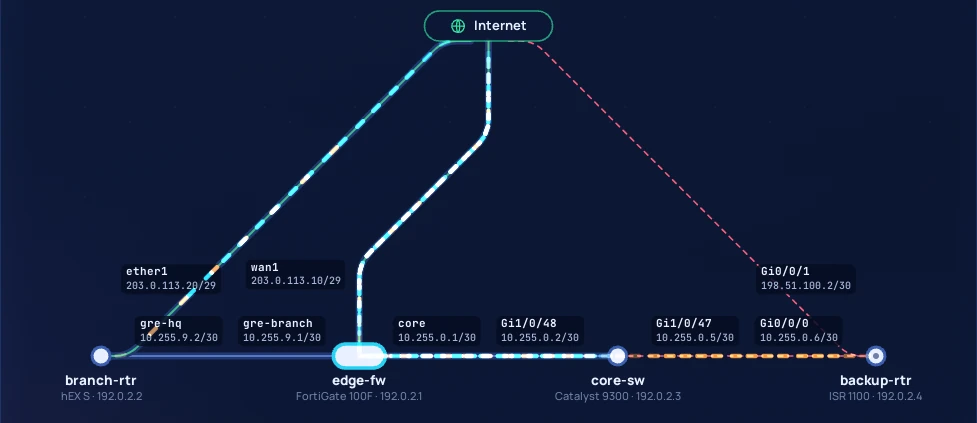
1. Choose the point of view
Point of View is the device the picture starts from; 1, 2, 3 is how many neighbours away to draw. The cards on the right count the links shown and the gaps — links where traffic went out and nothing came back.
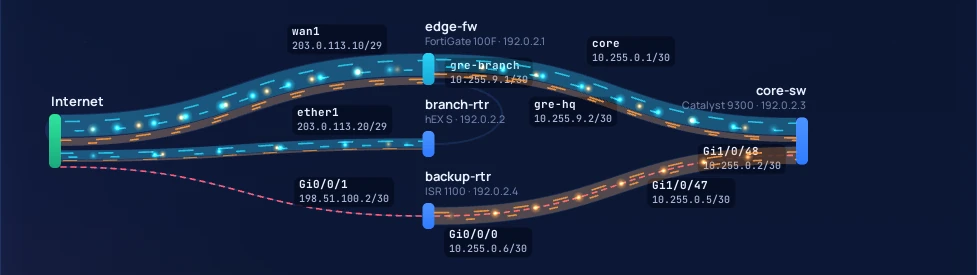
2. Pick a view
Classic, Lines, Stars, Metro and River draw the same network five ways; Your default view keeps your choice. Live animates the traffic of the last two minutes; Period shows the volumes of the chosen period.
3. Trace a path
In Path on the right, enter a source and a destination — addresses or networks — and press Trace. Each device on the way shows the interfaces the traffic used; a device whose interface recorded nothing is marked as a gap.
4. Read the link states
- Observed — both ends recorded the traffic.
- Gap — one end sent at least 1 MB and the other end's interface recorded nothing back.
- One end silent — NetFlow is off on one side's interface.
- Unobserved / adjacent — the devices share a subnet but no flows crossed it.
5. When a link is missing
- Unnumbered links (both ends borrow a loopback address) have no subnet to find them by. Turn SNMP on for both routers and LLDP on the link: FlowSphera reads the LLDP neighbours and draws the link on the LAG or VLAN unit that carries the traffic. The links table says Found by: LLDP neighbours.
- No LLDP? In Settings → Devices → Interfaces → Edit, choose the device and interface at the other end in the Neighbour column. One end is enough.
- Lines through the management network? Give the out-of-band port (
fxp0,em0,mgmt) the role Management: it never makes a link. FlowSphera marks such ports looks like management. - Addresses that several devices share — such as the internal ones every Juniper MX has — never make a link.
Questions
How does FlowSphera know which devices are connected?
From their interface addresses (a shared subnet) and from the addresses each device records on its interfaces. SNMP makes it exact.
A link shows a gap. What does it mean?
Traffic left one device towards the other and nothing came back on the other device’s interface — either NetFlow is off there, or the traffic took another way.