
FlowSphera 2.9.0 release notes
Links over LLDP and set by hand, the Management role: Path analysis for provider networks
FlowSphera 2.9.0 answers two requests from GitHub (#11, #12) by an operator of a provider network: Path analysis now draws links that have no addresses of their own, and the levels of a big network the way they really are.
Unnumbered links, found over LLDP
A point-to-point link between two routers often borrows a loopback address on both ends: there is no subnet to find it by. With SNMP on, FlowSphera now also reads each device's LLDP neighbours and its interface stack. The link appears on the map with the interface at each end, and with the traffic of the LAG or VLAN unit that runs over that port.
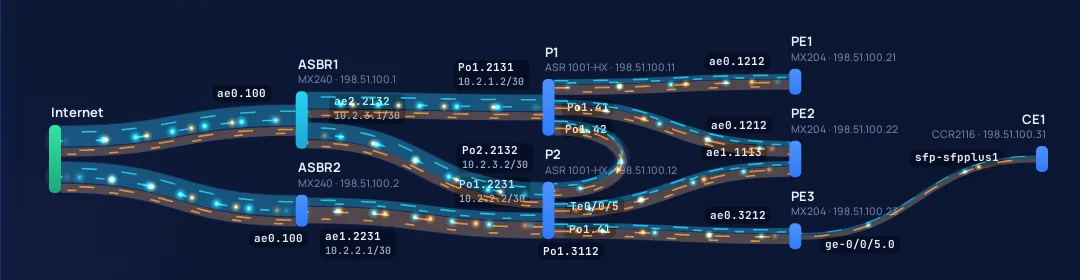
Links set by hand
Where LLDP is off, choose the device and interface at the other end in Settings → Devices → Interfaces. The Neighbour column shows both: what LLDP found and what you set.
Management ports stay out of the paths
Give an out-of-band port (fxp0, em0, mgmt) the role Management: its network no longer links every router to
every other. FlowSphera suggests the role for interfaces named like management ports.
Fixed
- Addresses that several devices share, such as the internal addresses every Juniper MX has, no longer make false links between them — they used to put the edge routers next to the core.
- Saving the device dialog keeps the interfaces' own capacities and the device's earlier addresses.
How to read the map: path analysis.
Upgrade: sudo flowsphera upgrade (settings and data are kept).