
What you see
Who uses the bandwidth. Every device behind the router with its download and upload for the last 15 minutes, a day or a month, with the services it used. RouterOS 7 has no IP Accounting any more, and Torch shows only the moment; FlowSphera keeps the history. See who uses the bandwidth on a MikroTik.
Downloads on the right device, behind NAT. RouterOS exports a download with the router's WAN address as the destination and the real device in the post-NAT fields. FlowSphera reads those fields, so downloads land on the laptop or phone that made them, also when the router itself sits behind the provider's NAT or CGNAT (FlowSphera 2.12.1 or newer). Background: NetFlow shows the public IP instead of the LAN host.
VPN users in one place. SSTP, L2TP, PPTP, OpenVPN and PPPoE create a new interface for every session; FlowSphera folds them by name, so one user is one line, not a hundred interfaces.
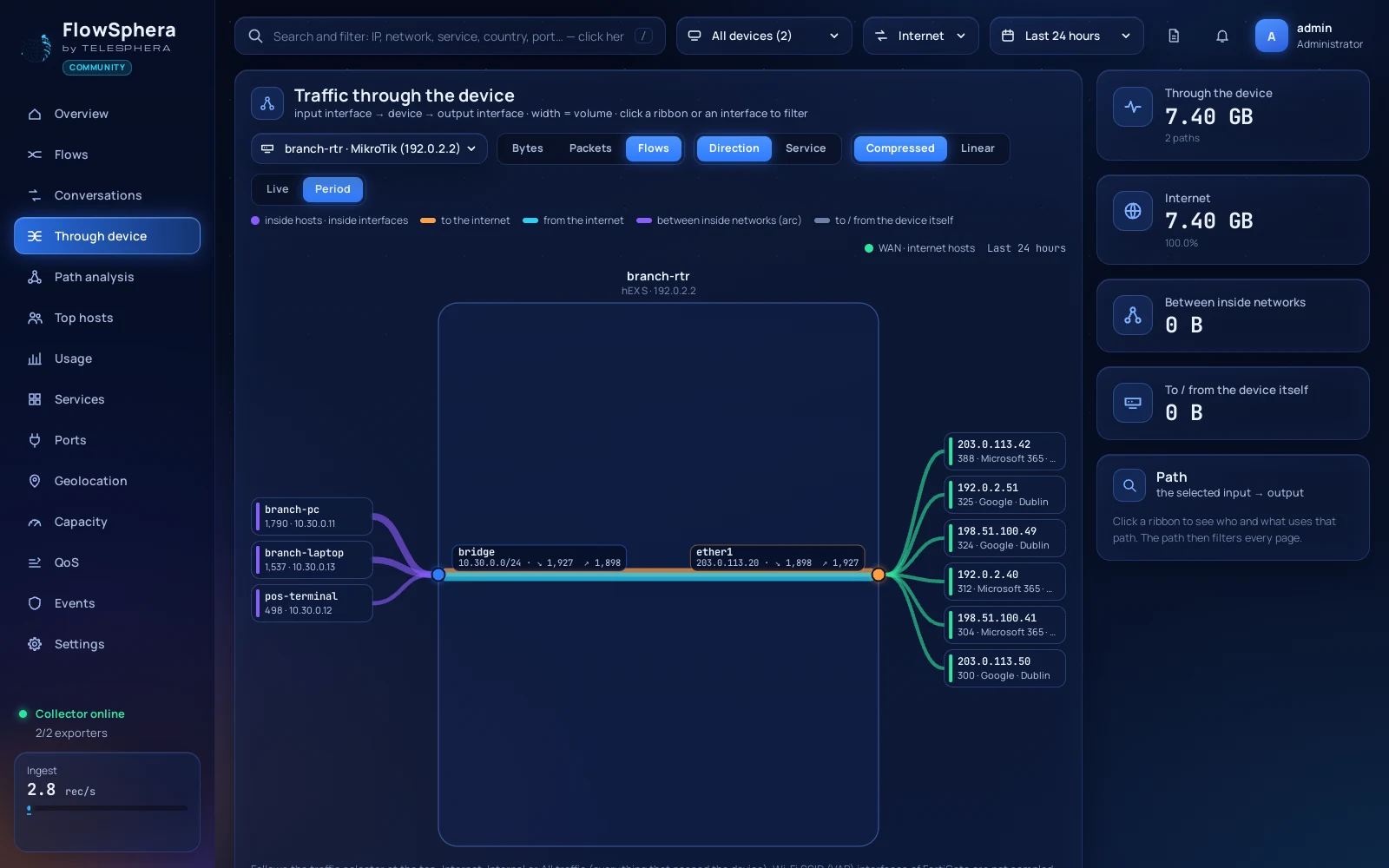
Traffic through the router. Input interface to output interface, with the hosts behind each, and interface names over SNMP.
Security events. Port scans, password guessing, floods and contact with known malicious addresses, with alerts to Telegram, e-mail, webhooks or your SIEM.
How to set it up
- Install FlowSphera on a Linux server with one command.
- On the MikroTik, two commands:
/ip traffic-flow set enabled=yes interfaces=all active-flow-timeout=1m
/ip traffic-flow target add dst-address=<COLLECTOR_IP> port=2055 version=9- In Settings → Devices, give the internet-facing interface the WAN role.
Every step, with checks and SNMP: Configure NetFlow on MikroTik.
What to know
Use NetFlow v9 or IPFIX, not v5: only they carry the NAT fields. For one interface per VPN user, give each user a static server binding, for example /interface sstp-server add name=sstp-alice user=alice.
Checked on a MikroTik hAP ac² with RouterOS 7, and on RouterOS 7.17 (CHR) in a test lab with a WAN behind a provider's CGNAT.
Questions
Which RouterOS versions work?
RouterOS 7 with Traffic Flow, NetFlow v9 or IPFIX. It is checked on a hAP ac² and on RouterOS 7.17 (CHR).
Why are downloads shown on my router or public IP in other tools?
RouterOS puts the real device into the post-NAT fields of the record. FlowSphera reads them; a collector that does not shows the WAN address.
Does Traffic Flow slow the router down?
It adds work to the router, how much depends on the model and the traffic. Start with active-flow-timeout=1m and watch the CPU in /system resource.
What does it cost?
Community is free for up to 5,000 records per second and 30 days of history, with every feature. A Pro license raises the limits.