
What you see
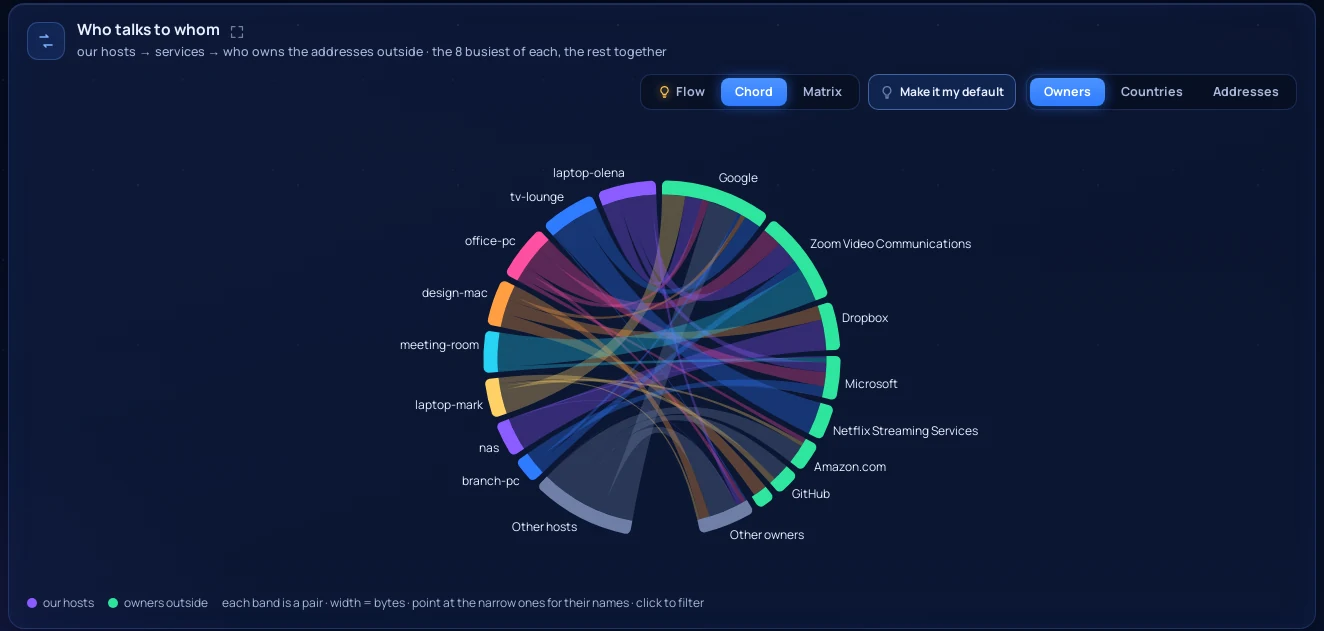
Who talks to whom through every router. Hosts, conversations, services and countries, for the last 15 minutes or any month, from the Flexible NetFlow of your Cisco routers.
The path across your network. Path analysis follows a conversation hop by hop through every device that exports flows, interface by interface, and shows where traffic goes in and nothing comes back.
Interface load and names. Traffic on each interface, named over SNMP v2c or v3.
Security events. Port scans, password guessing, floods and contact with known malicious addresses, with alerts to Telegram, e-mail, webhooks or your SIEM.
How to set it up
- Install FlowSphera on a Linux server with one command.
- On Cisco IOS-XE, a Flexible NetFlow record with the flow direction, an exporter and a monitor on the interfaces:
flow record FT-REC
 match ipv4 source address
 match ipv4 destination address
 match ipv4 protocol
 match transport source-port
 match transport destination-port
 match interface input
 match flow direction
 collect interface output
 collect counter bytes long
 collect counter packets long
 collect timestamp sys-uptime first
 collect timestamp sys-uptime last
flow exporter FLOWSPHERA
 destination <COLLECTOR_IP>
 transport udp 2055
 template data timeout 60
flow monitor FT-MON
 exporter FLOWSPHERA
 record FT-REC
 cache timeout active 60
interface GigabitEthernet0/0/0
 ip flow monitor FT-MON input
 ip flow monitor FT-MON output
Repeat the two ip flow monitor lines on every interface you want to see. More vendors and details: exporter documentation.
What to know
Monitoring a flow both on the way in and on the way out is fine: the flow direction field lets FlowSphera keep one copy. For SNMP, keep snmp-server ifindex persist, so the interface numbers in NetFlow and SNMP stay the same after a reload.
Cisco ASA NSEL (NetFlow Security Event Logging) is not read yet, and this configuration exports no NAT fields. FlowSphera runs with Cisco IOS-XE routers in multi-vendor networks of its users; a Cisco router in our own test lab is still to come.
Questions
Which Cisco devices work?
Routers with Flexible NetFlow on IOS-XE, using the configuration above. Cisco ASA NSEL is not read yet.
Why match flow direction?
When an interface is monitored both ways, the same flow is reported twice. The direction field lets FlowSphera keep one copy.
Can it name the interfaces?
Yes, over SNMP v2c or v3. Keep snmp-server ifindex persist so the numbers do not change after a reload.
What does it cost?
Community is free for up to 5,000 records per second and 30 days of history, with every feature. A Pro license raises the limits.