
FlowSphera 2.6.0 release notes
Devices on the map by their city, networks found with no setup, IP reputation lists by URL, MikroTik VPN sessions folded
FlowSphera 2.6.0 makes three things work with no setup at all: your devices stand on the map by their city, your networks show up by themselves, and any blocklist on the web can be added by its URL. It also cleans up the interface lists of MikroTik routers that serve VPN or PPPoE users.
A device on the map by its city
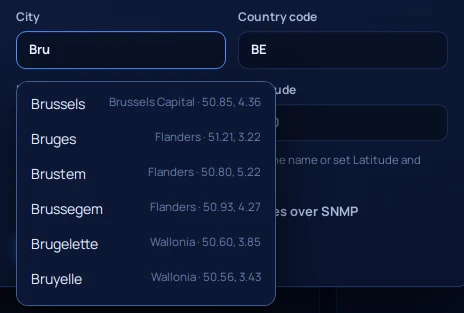
The connection map and the 3D globe draw a line from each of your devices to the far end of every connection. Until now a device needed its latitude and longitude for that. Now the city is enough: type the country code and start typing the city — FlowSphera offers the places of that country with their region and coordinates.
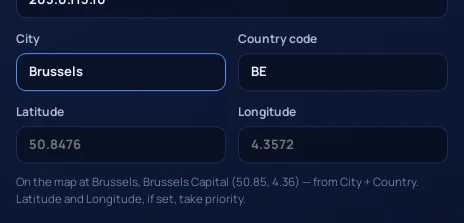
The line under the coordinates says where the device will stand. Latitude and longitude stay for when you want the exact spot, and they win when filled in.
The places — about 150,000 of them — come from the DB-IP city database FlowSphera already installs for GeoIP. Nothing is sent to an online geocoding service; the list is rebuilt after each monthly database refresh. A device saved earlier with a city and a country but no coordinates is placed right after the upgrade.
Your networks, found by themselves
Top hosts → Networks shows the traffic, the trend and the main services of each network. It used to stay empty until
you named your networks. Now the networks are found from the addresses of your devices' interfaces — read over SNMP or
typed by hand — with their own masks, so a /16 stays one network instead of 256 small ones, and each row says which
interface of which device it sits behind. Networks you name come first.
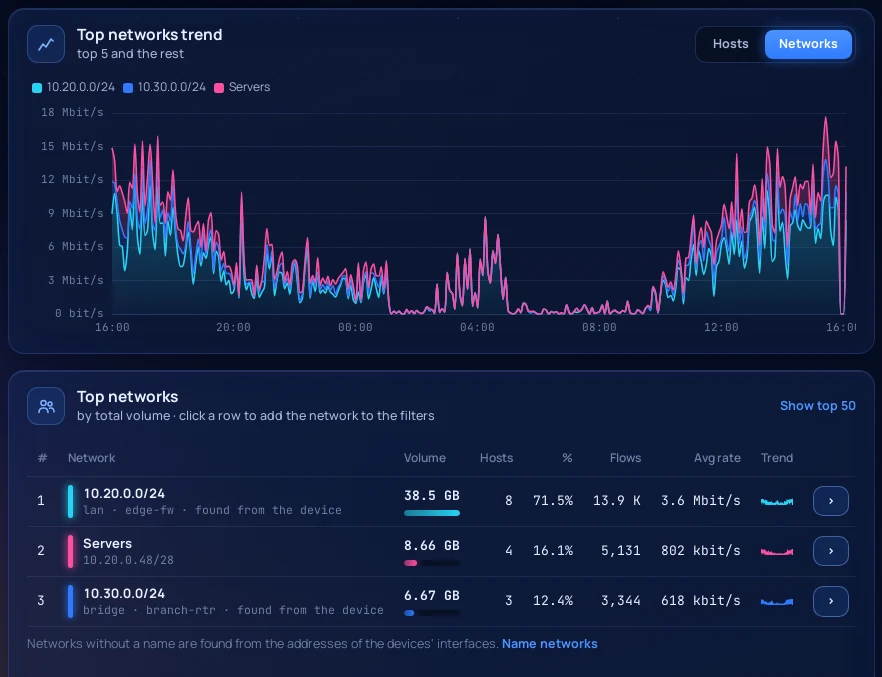
An inside address that no interface covers falls into its /24, marked as a guess. A click on a row filters every page
by that network (net:10.20.0.0/24), and the same networks fill the Your networks part of the PDF reports.
IP reputation lists by URL
FlowSphera checks every connection against eight public reputation lists. Now you can add up to ten of your own that live on the web — a vendor's feed, your SOC's export, a partner's list of scanners: a name, the URL, what it holds and how often to download it, from every hour to every week.
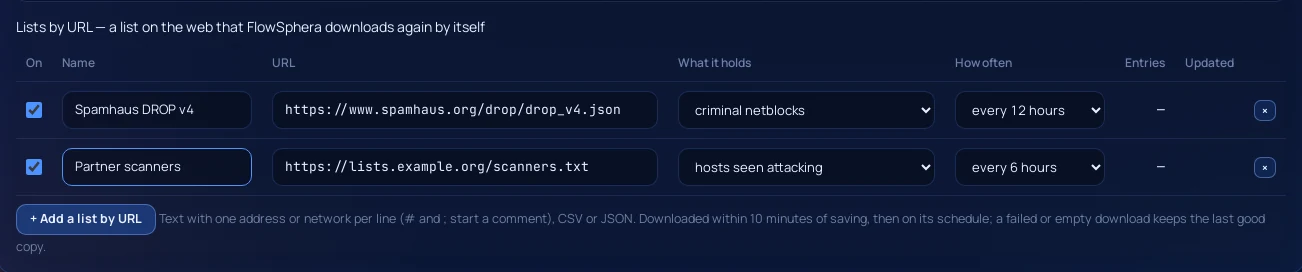
Plain text (with # and ; comments, so Spamhaus DROP works as published), CSV, JSON and JSON lines are all read.
A download that fails or comes back empty keeps the last good copy and says so in the table; private ranges and blocks
wider than /8 are always left out, so a mistake in a list never flags your LAN.
A new category, spam sources, fits lists such as Spamhaus SBL or UCEPROTECT.
How much FlowSphera asks your DNS server
The names of your inside hosts come from reverse DNS when you have not named them yourself. Settings → General → Host names from DNS now lets you choose: off, only for the hosts a page shows, or also in the background — 5, 20 or 50 lookups a second, each host once a day, never more than four at a time, so a slow DNS server automatically gets fewer. Turn it down or off when your DNS server forwards private PTR queries to your provider.
MikroTik VPN and PPPoE sessions
RouterOS creates a new interface, with a new number, for every VPN (SSTP, L2TP, PPTP, OpenVPN) or PPPoE session. On a
router with remote users this filled Capacity with rows like «if 15738749». FlowSphera now keeps the name of every
interface number it has seen and folds these interfaces into one line per name on Capacity and in Settings →
Devices. For one interface per user, give each a static binding on the MikroTik:
/interface sstp-server add name=sstp-alice user=alice.
Also fixed
- Settings → Devices: the Site column showed
[object Object]; in the device dialog the IP and Name fields were not aligned.
Upgrade
sudo flowsphera upgrade — settings and data are kept. The full list of changes is in the
release notes; how to set each of these up is in the guides.